# Identity Services
> Understand identity services prerequisites and how to integrate your existing identity with OIDC.
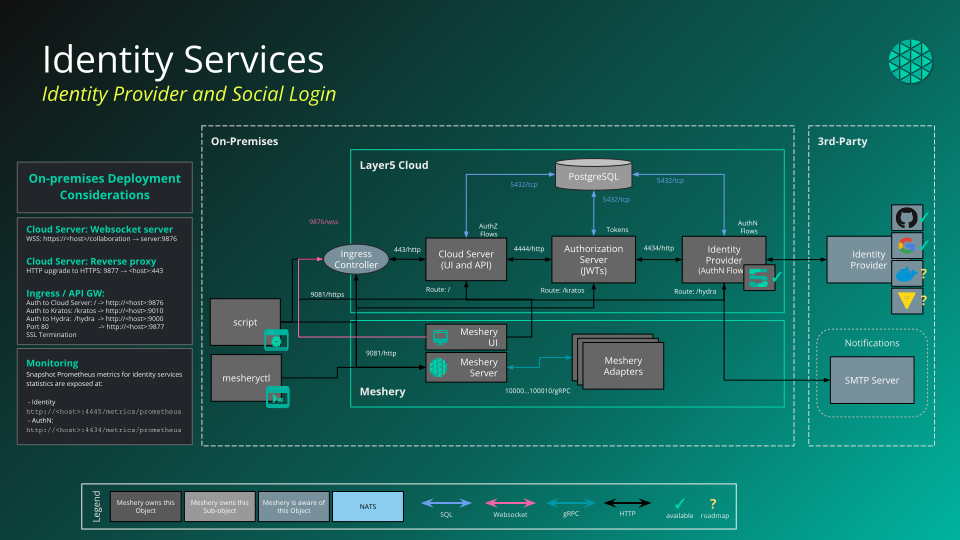
Layer5 Cloud offers a built-in identity provider (IDP), supporting OIDC for normal users and token-based authentication (access, ID, refresh tokens) for API clients with JSON Web Signature (JWS) for token signing. Layer5 Cloud users can sign-up via email and password in addition to social identity providers (Google and GitHub) via OAuth2. See [Getting Started with a Layer5 Account](/cloud/getting-started/getting-started-with-layer5-account/) for details.
Layer5 Cloud identity services include features such as account recovery, email verification, automatica social sign-in account linking, and multi-factor authentication (coming soon).
Layer5 Cloud is also working toward being the IDP for Layer5 by supporting OIDC. It will leverage social authentication with Google, GitHub, Twitter, and LinkedIn based on OIDC to authenticate normal users. After authentication, Layer5 Cloud will be able to generate the access token, ID token, and refresh token for normal users. Applications, on the other hand, will use client credential OAUTH2 to get an access token.
The following diagram illustrates the architecture of Layer5 Cloud.
## Identity providers and custom domains
Info
This page covers the
mechanics of identity providers and authentication boundaries. For the named, end-to-end
organization configurations that combine these choices with custom domains — and guidance on when to pick each — see
Organization Configuration Scenarios.
By default, every organization signs users in through your deployment's **shared (default) identity providers** — the Google and GitHub OAuth applications configured for the Provider Organization. Users see those applications' name and logo on the Google or GitHub consent screen, and no per-organization setup is required.
### Bring Your Own Credentials (BYOC)
An organization can optionally **bring its own credentials (BYOC)**: its own Google OAuth client and GitHub OAuth App. With BYOC, the upstream consent screen, the registered redirect URL, and the entire OAuth round trip carry the organization's own branding and stay on the organization's own domain. BYOC is enabled per organization by a [Provider Administrator](/cloud/concepts/identity-and-security/roles/#provider-admin-role); an organization owner then registers the OAuth client ID and secret.
### BYOC is always optional
BYOC is **always optional**. Social sign-in (Google and GitHub) works out of the box on every [custom domain](/cloud/guides/self-hosted/white-labeling/#social-sign-in-on-a-custom-domain) — including a fully-custom domain on a different **base domain** (the registrable domain, or eTLD+1) from your deployment — using the deployment's default identity providers. You bring your own credentials only when you want your own brand, controls, or isolation, never to make social sign-in available:
| Organization's domain | Default identity providers | BYOC |
| --- | --- | --- |
| No custom domain, or a subdomain of the deployment's base domain (e.g. `team.example.com` on a `cloud.example.com` deployment) | Social sign-in works out of the box | **Optional** — only for your own branding, scale, or isolation |
| A fully-custom domain on a different base domain (e.g. `meshery.yourcompany.com` pointed at the hosted `cloud.layer5.io`) | Social sign-in works out of the box | **Optional** — only for your own branding, scale, or isolation |
On a fully-custom domain, the Google and GitHub buttons are shown alongside email-and-password sign-in and work without any per-organization configuration. Configuring the organization's own identity providers (BYOC) changes *whose* OAuth apps and consent screen are used — it does not gate whether social sign-in is available.
### The identity provider is the security boundary
When you are reasoning about which organizations sit inside the *same* authentication boundary, look at the connected identity provider — not at the name or DNS shape of the host:
> **Same identity provider source means the same security boundary.**
Organizations that share an identity provider sit within the same authentication boundary; an organization that brings its own provider (BYOC) is a distinct authentication boundary. This holds regardless of which *class* of host an organization is reached on:
| Host class | Example | Identity provider it uses | Authentication boundary |
| --- | --- | --- | --- |
| **Canonical host** | `cloud.layer5.io` | The deployment's shared, central provider | The shared boundary |
| **On-eTLD custom host** (a subdomain under the same base domain as the canonical host) | `partner.layer5.io` on a `cloud.layer5.io` deployment | The same shared, central provider | The **same** shared boundary as the canonical host |
| **Off-eTLD custom host** (a fully-custom domain on a different base domain) | `meshery.yourcompany.com` pointed at `cloud.layer5.io` | The same shared, central provider (unless BYOC is configured) | The **same** shared boundary as the canonical host (unless BYOC is configured) |
| **Any host, with BYOC** | any of the above, after configuring BYOC | The organization's own dedicated provider | A **distinct** boundary |
By default, every host class — canonical, on-eTLD, and off-eTLD — draws on the shared, central identity provider, so organizations reached through them sit within one shared authentication boundary. An organization with its own (BYOC) identity provider is its own boundary, no matter how its host is named. The DNS shape of the host is not the boundary — the identity provider behind it is.
This is the authentication (host-class) view of the boundary. It composes with the **authorization** view — where each organization context independently scopes what a user is permitted to do via [keys](/cloud/concepts/identity-and-security/keys/), [keychains](/cloud/concepts/identity-and-security/keychains/), and [roles](/cloud/concepts/identity-and-security/roles/) — and with **granular** resource-access sharing that can cross organizations. For the complete picture of how these layers fit together, see [Identity and Security → Security Boundaries](/cloud/concepts/identity-and-security/#security-boundaries).