Deploy Azure resources with Meshery
Categories:
Introduction 🔗
Meshery now supports managing Azure resources declaratively through Kubernetes by integrating with Azure Service Operator (ASO). With this capability, you can visually design, deploy, and manage a variety of Azure resources—such as Storage Accounts, Key Vaults, SQL Servers, and more—directly from Meshery’s UI. In this tutorial, you’ll install the ASO operator (without CRD pattern configurations, as Meshery will handle them), create a Service Principal and a Kubernetes secret with your Azure credentials, and use Meshery to provision Azure resources seamlessly into your subscription.
Prerequisites 🔗
Before you begin, ensure you have the following:
- Meshery Installed A self-hosted Meshery instance running on your Kubernetes cluster (in-cluster or out-of-cluster).
- Kubernetes Cluster
A running Kubernetes cluster (v1.16+) with
kubectlconfigured. - Azure Subscription An active Azure subscription where Storage Accounts will be provisioned.
- Azure CLI
Installed and authenticated (
az login) in your local shell. - cert-manager Installed in your Kubernetes cluster (required by Azure Service Operator).
- Meshery Catalog: Access to the Meshery Catalog so you can clone the operator design. There is no separate Catalog extension to enable. Do not run this tutorial on Meshery Playground. It stores real Azure credentials in a Secret, and Playground is a shared cluster. Hosted kanvas.new has no Deploy action.
Table of Contents 🔗
1. Create Azure Service Principal 🔗
If you do not already have a Service Principal (SP) for Meshery, create one using the Azure CLI:
az ad sp create-for-rbac -n azure-service-operator --role contributor --scopes /subscriptions/<AZURE_SUBSCRIPTION_ID>
This command outputs the following credentials:
appId: Application ID (Client ID)displayName: Service Principal Namename: Azure Service Principal URLpassword: Client Secrettenant: Tenant ID
To export them, manually enter:
export AZURE_CLIENT_ID=<appId>
export AZURE_CLIENT_SECRET=<password>
export AZURE_TENANT_ID=<tenant>
export AZURE_SUBSCRIPTION_ID=<subscriptionId>
2. Connect Meshery to Your Cluster 🔗
If you haven’t already connected your cluster to Meshery, run:
mesheryctl system start
Then open the Meshery UI (default: http://localhost:9081) and ensure your cluster appears under Lifecycle → Connections.
3. Install Azure Service Operator (Operator Only) 🔗
Prerequisite 🔗
Create a cert-manager that is necessary for deployment of Azure Service operator
kubectl apply -f https://github.com/jetstack/cert-manager/releases/download/v1.14.1/cert-manager.yaml
3.1 Deploy ASO Operator 🔗
Apply the official ASO operator manifest (Meshery will manage CRDs):
kubectl apply -f https://github.com/Azure/azure-service-operator/releases/download/v2.13.0/azureserviceoperator_v2.13.0.yaml
3.2 Create Azure Credentials Secret 🔗
Azure Service Operator requires a Kubernetes secret with your Azure identity:
kubectl create secret generic azure-credentials --namespace azureserviceoperator-system --from-literal=AZURE_CLIENT_ID=$AZURE_CLIENT_ID --from-literal=AZURE_CLIENT_SECRET=$AZURE_CLIENT_SECRET --from-literal=AZURE_TENANT_ID=$AZURE_TENANT_ID --from-literal=AZURE_SUBSCRIPTION_ID=$AZURE_SUBSCRIPTION_ID
4. Deploy Azure Service Operator using Kanvas 🔗
- Click Start from template. Start From Template
- Search for the Azure Service Operator design. Search Azure Operator
- Once found, click on the Azure Service Operator design, then click Clone to add it to your canvas. Clone Azure Operator
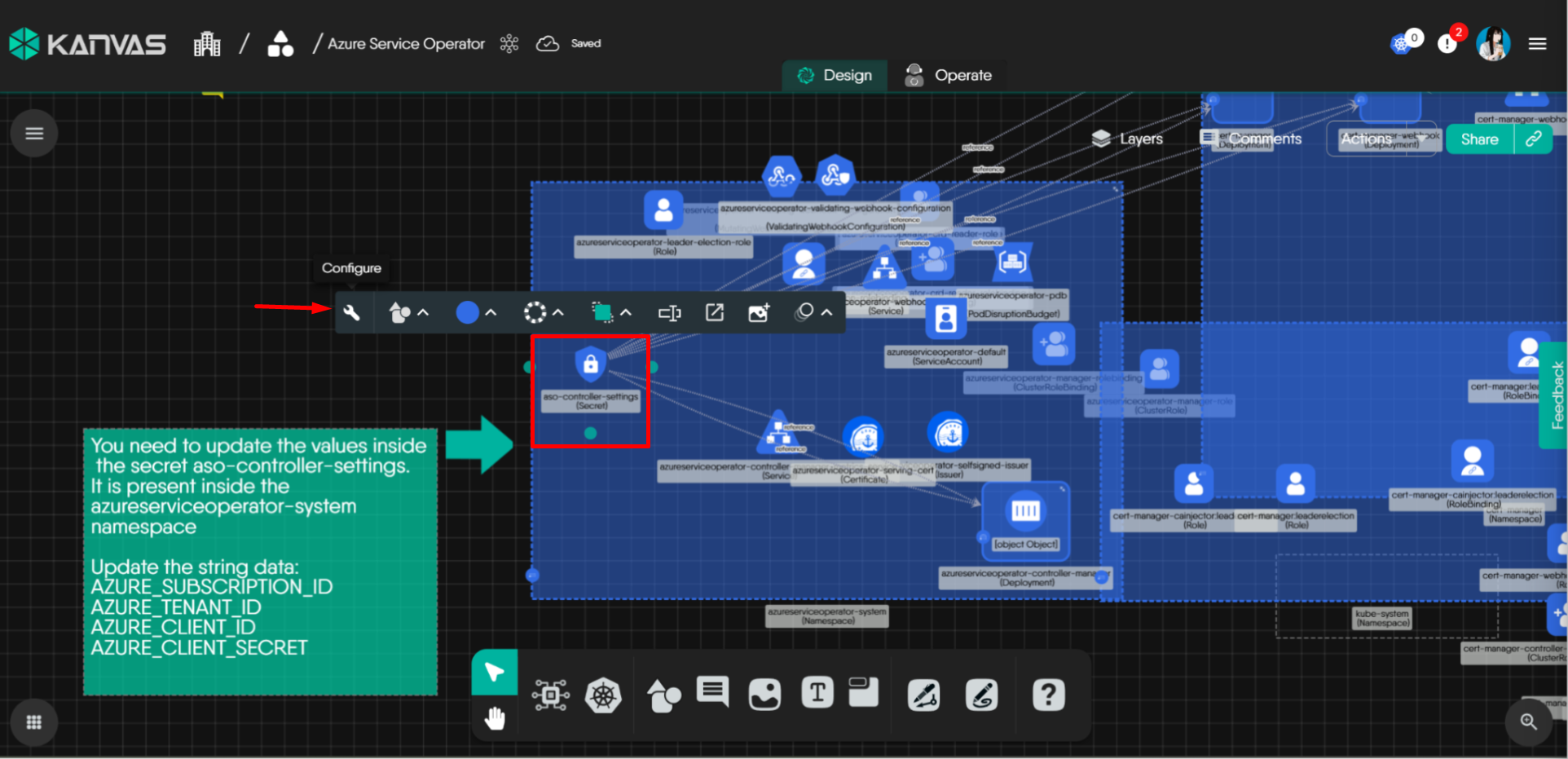
- Update the secret aso-controller-settings in the design template. The details are also mentioned in the catalog. Configure Secret Settings
- Click Actions → Deploy. Deploy Azure Operator



5. Start deployment of Azure resources using Kanvas 🔗
- Click on Components, search for Azure Storage, and add the Storage Account to the design area. Select Components Search Storage Account
- Configure the Storage Account to fit your needs. Config Storage Account
- Click Actions → Deploy. Deploy Storage Account
- Azure Portal: Confirm the new Storage Account appears in your specified resource group.


6. Conclusion 🔗
You have successfully:
- Created an Azure Service Principal for Meshery
- Connected your Kubernetes cluster to Meshery
- Installed the Azure Service Operator (Meshery managed CRDs)
- Created a Kubernetes secret for Azure credentials
- Designed and deployed Azure resources using Meshery’s Kanvas
If you want to learn more about Azure Service Operator, visit the official ASO documentation.
Related Reading
- Building a GCP Data Pipeline Design
- Collaborative Editing
- Cross-Org Design Access: stellar-saas-platform
- Deploy AWS EC2 Instances with Meshery
- Deploy Azure Storage Account with Meshery
- Deploying Apache Cassandra with a StatefulSet in Meshery Playground
Recent Discussions on Kanvas
- Jul 12 | Unleash Visual Power: Import Your Configs by zihan kuang
- Oct 14 | Explore Meshery's Published Relationship Design Examples by Awani Alero
- Oct 03 | Design Review RFC: Kanvas Empty State Enhancement by Lee Calcote
- Jul 19 | [For Discussion] Visual indication of semantically vs non-semantically meaningful Meshery components by Lee Calcote
- Jun 07 | What are the conditions for a "System is unhealthy" warning? by James
- May 30 | Looking for a meshmate to help with first PR by Faisal Imtiyaz123
- Feb 28 | For Discussion: Capturing potential, but unrealized Relationships in Design Snapshots by Lee Calcote
- Feb 12 | Hint on Scaling & Verifying Cronjob in Playground by Sandra Ashipala