Metrics
Metrics are quantifiable measures used to track and assess the status, progress, and performance of various activities and user interactions with Designs.
Public Catalog: https://cloud.layer5.io/catalog
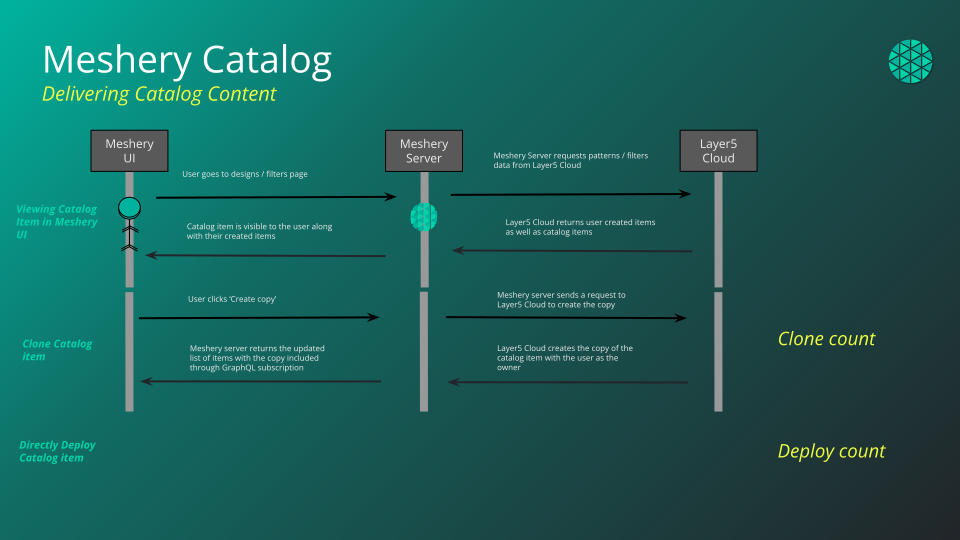
The Cloud Catalog is a web-based, public catalog to facilitate easy discovery of existing designs. Designs that are published into the catalog can be, but are not always curated for known best practices and patterns. Content is published at cloud.layer5.io/catalog, and one-click import of catalog content into Meshery Server is seamlessly integrated.
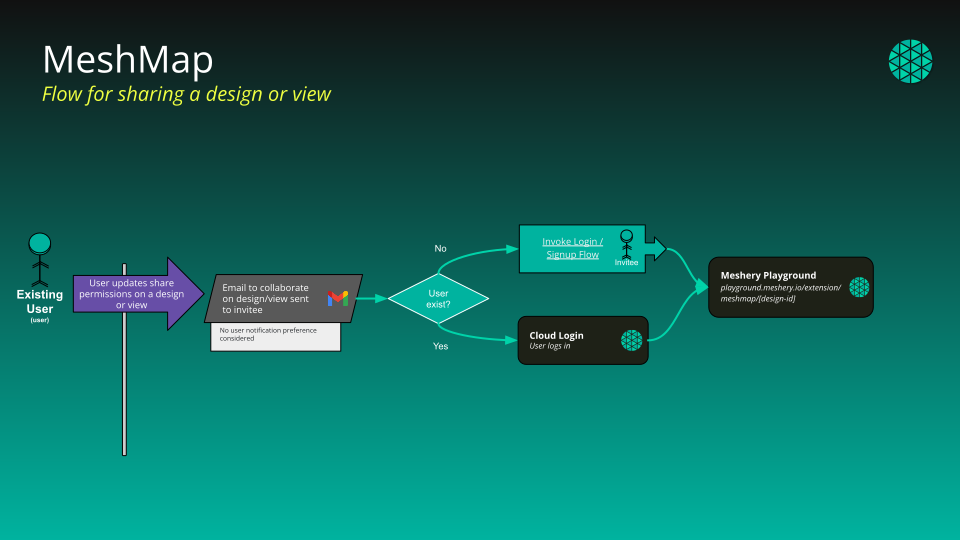
Each item in the catalog comes with an associated level of visibility.
Catalog content is categorized in a number of ways:
To publish a design into the catalog:
Your filter list at My Filters is not limited to filters you created. When you are signed in, it returns:
Private filters belonging to other people are never returned. The one exception is a provider administrator, who can see private content across the provider.
Signed-out visitors browsing someone’s public profile see only that person’s public and published filters.
Filters can be browsed in grid view or table view, and searched and sorted from either. For the operations you can perform on a filter once you have found it - import, publish, unpublish, clone, download, edit, view details, and delete - see Envoy WASM Filter Management in the Meshery documentation.
WebAssembly filters can be brought into Layer5 Cloud in two ways:
http or https URL that serves the filter body directly.An imported filter is saved under the name you enter on the import form, whichever method you use.
Layer5 Cloud is a hosted, multi-tenant service, so a URL import is fetched from Cloud’s own network rather than from your machine. A URL whose host resolves - or redirects - to a loopback, link-local, private, carrier-grade NAT, or IPv6 unique-local address is refused, and only http and https URLs are accepted.
If your filter lives on an internal host, a private network, or anything else Cloud cannot reach from the public internet - an internal Git server, for example - use File Upload instead. It is the supported path for those sources and no capability is lost. There is deliberately no allowlist or opt-out setting.
If an import URL is mistyped, has moved, or answers with anything other than a success status, the import fails with 400 Bad Request: the URL is the problem, so check that it is reachable from the public internet and serves the filter body itself rather than a download page. A 500 or 502 means the fetch itself failed in transit (for example a connection, TLS, or timeout failure) against a URL that was otherwise permitted.
| Class | Meaning |
|---|---|
| Official | Produced and fully supported by Meshery maintainers. |
| Verified | Produced by partners and verified by Meshery maintainers. |
| Community | Produced and shared by Meshery users. |
| Stage | What happens | Who is notified |
|---|---|---|
| 1. Request | A signed-in user publishes a design with its catalog metadata. Without Approve Catalog Request, this creates a pending request and the design’s visibility does not change yet. | Catalog maintainers receive an email, and the requester receives a copy. |
| 2. Review queue | Pending requests wait. Reviewers see the author, the author’s email, the content name and type, the status, the class, and when the request was created. The queue shows the reviewer’s current organization, or all organizations for holders of View All Organizations. | |
| 3. Approve or deny | A reviewer approves, choosing the class, or denies. Approval publishes the design and records its published version. Denial leaves visibility unchanged. Only pending requests can be decided. | The owner receives an approval or denial email, unless notification preferences turn approval emails off. |
| 4. Published | The design is in the catalog. | |
| 5. Unpublish | The design’s creator, or a holder of Approve Catalog Request, removes it. The design becomes private. |
The publish form asks for a type, at least one technology, a description, and caveats. Denying a request is checked against Approve Catalog Request, the same as approving. Holding Deny Catalog Request alone does not let you deny a request.
Each design can have only one publish request, ever. A design that already has a request, whether pending, approved, or denied, cannot be submitted again. Unpublishing does not clear the earlier request.
Once a design is published, its visibility cannot be changed from the publish dialog. Unpublishing returns the design to private, not public. Catalog metadata stays on the design after unpublishing.
The Cloud catalog and the public Meshery catalog website are separate listings. When a holder of Approve Catalog Request publishes a design directly, Layer5 Cloud triggers a refresh of the Meshery catalog website. If that refresh cannot be triggered, the publish still succeeds. Approving a request from the review queue does not refresh the Meshery catalog website.
A clone is a private copy that you own. The original stays untouched.
Every design keeps five counters: Opens, Downloads, Deploys, Clones, and Shares. They are lifetime totals with no deduplication and no reset. See Metrics and Leaderboard.
The leaderboard is the catalog sorted by one of those counters, Opens by default. The catalog page shows top performers in a summary panel.
Browsing the catalog requires no permission and no account. Publishing, reviewing, unpublishing, and cloning use View Catalog Requests, Approve Catalog Request, Deny Catalog Request, Publish Design, Unpublish Design, Clone Design, and View Designs. Users and Team Admins can unpublish only designs they created. Workspace Admins, Organization Admins, and Provider Admins can unpublish any design. See Default Permissions.
Layer5 Cloud does not check your plan when you publish, review, or clone a design.
Published WebAssembly filters are available to Meshery and to API clients. The public catalog listing in this page’s sense is designs. To manage filters you already have, use My Filters as described above, and Filter Management in the Meshery documentation.
Metrics are quantifiable measures used to track and assess the status, progress, and performance of various activities and user interactions with Designs.
The Leaderboard is a visual representation of Designs, ranked based on key Metrics such as Opens, Downloads, Deployments, Clones, and Shares.
Discover how to browse, find, and interact with designs in the Catalog.

